Themes
A theme in Longmatter restyles the whole window: the sidebar, the tabs, the panels and the page you are writing on. It is the one part of the editor you are expected to change, so this page says what each control actually does and where the result is kept.
Where to find them
Themes is in the bar along the top of the window, next
to Source, Write and Preview. It is also in the command palette, which
opens with ⌘⇧P: type "themes". Both open the
same dialog, and the theme you are using is named in the bottom right
of the window whether the dialog is open or not.
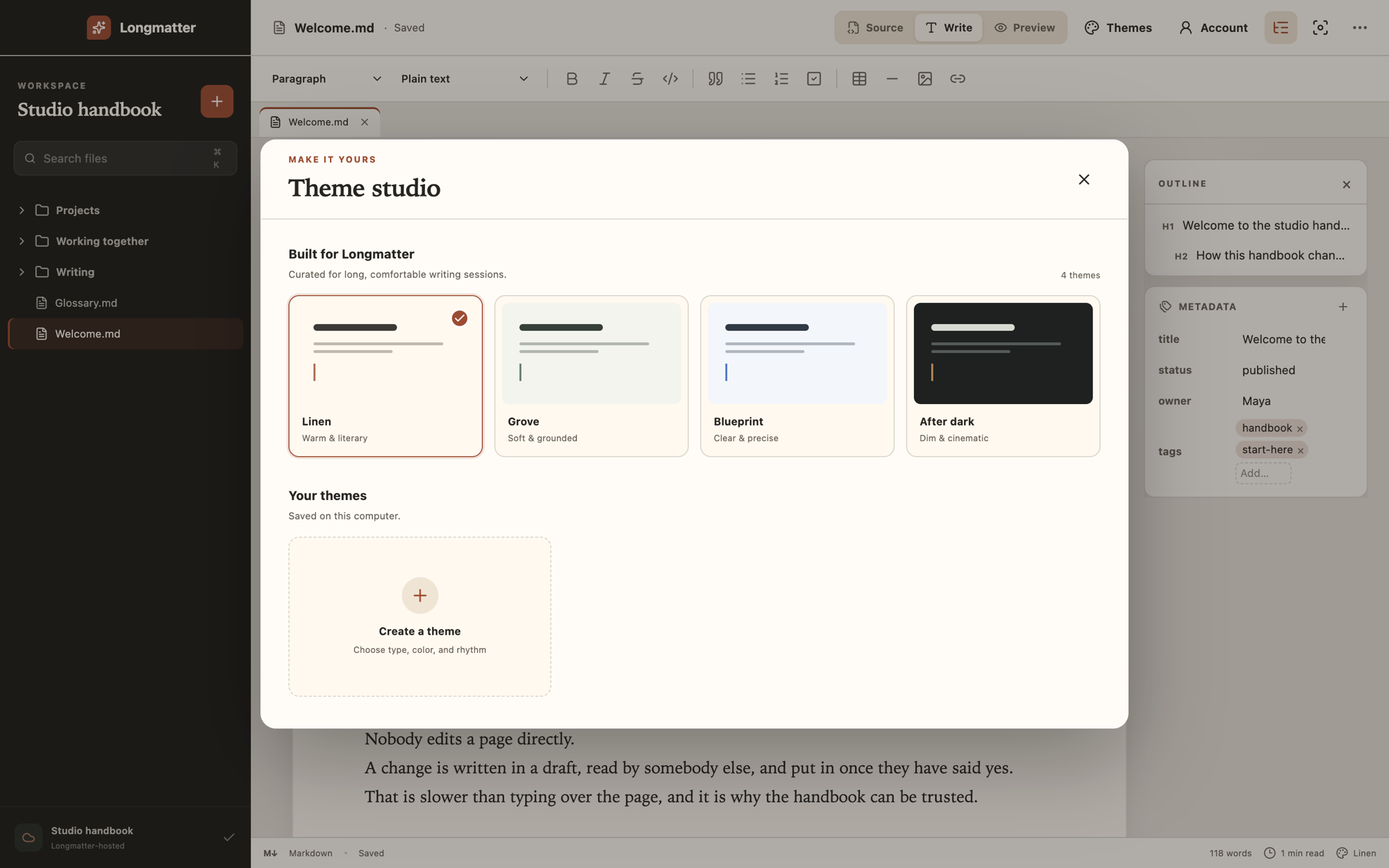
The four that come with it
They exist because the same writer wants a different room on a different day, not because four is a number anybody arrived at. Each one changes the typeface, the colours and the line spacing together, since those three are what make a page comfortable or tiring over several hours.
- Linen. Warm and literary. A serif for the writing and for headings, on a cream page. It is the one Longmatter starts in.
- Grove. Soft and grounded. A serif for the writing with a sans heading, on a pale green page.
- Blueprint. Clear and precise. Sans throughout, on a cool grey page, with the tightest line spacing of the four.
- After dark. Dim and cinematic. A dark page with a serif heading and an amber accent.
Choosing one applies it immediately, and to every window. There is no per‑project theme: the editor is a room, and you are in one room at a time.
Building your own
Create a theme opens a form with a live preview beside it. Five things are yours to set.
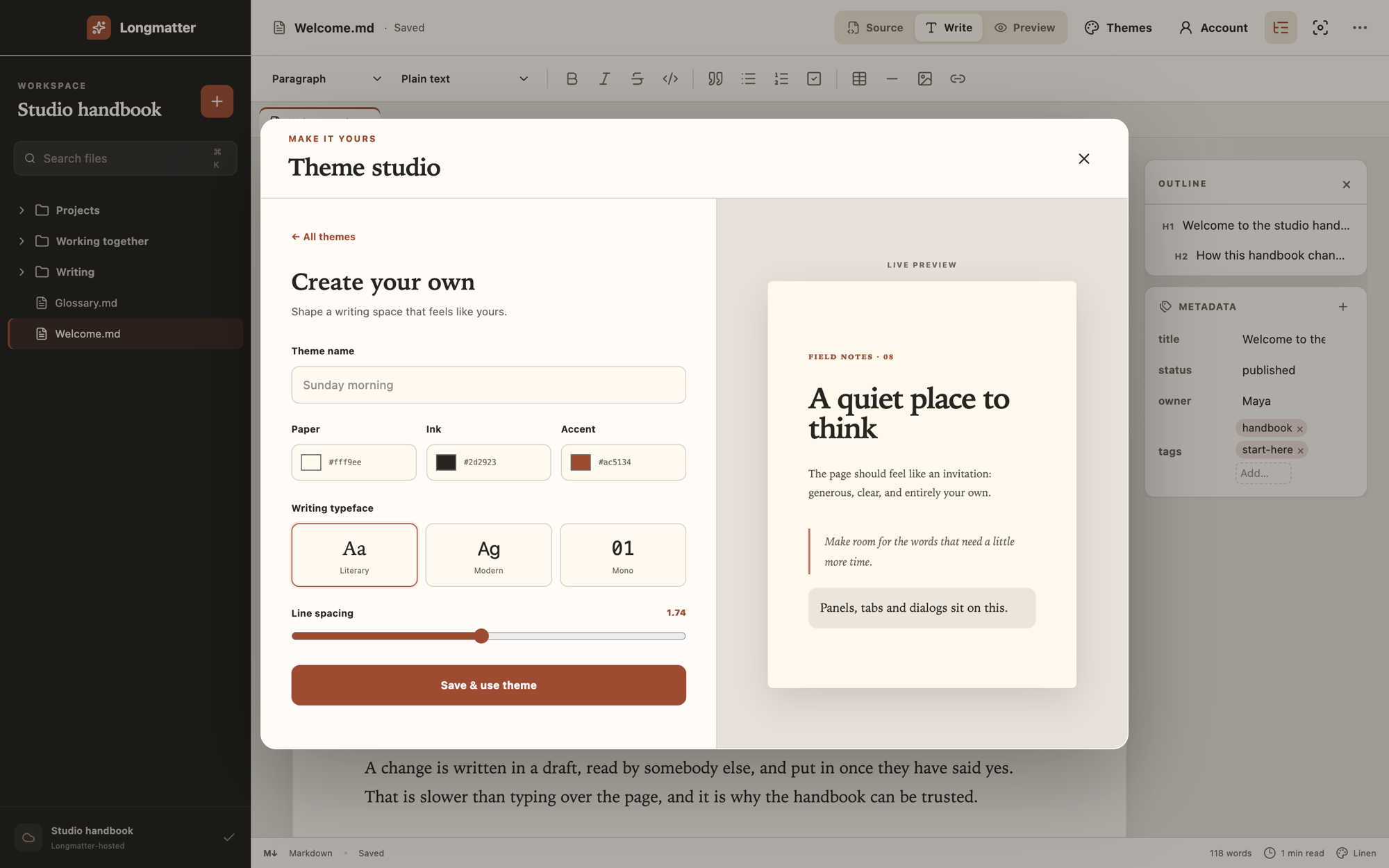
- Paper is the page you write on, and it decides far more than it appears to. Everything around the page is mixed from it: the sidebar, the toolbar, the panel backgrounds and every border. It also decides whether the window reads as light or dark, which is measured rather than toggled, so a dark paper darkens the whole application without a separate switch.
- Ink is the writing itself, and the headings, and the text in every panel.
- Accent is links, the marker on the theme you are using, the bar on a quotation, and the save button. It is text at body size in places, so it has to be readable and not merely visible.
- Writing typeface. Literary is a serif, Modern is your system's sans, Mono is a fixed‑width face. These are typefaces already on your machine, because the editor loads no fonts from anywhere.
- Line spacing, from 1.5 to 2. The four built‑in themes sit between 1.68 and 1.76, which is a useful range to start in.
Save & use theme saves it and switches to it.
Contrast, and what is checked
The four built‑in themes are held to 5:1 between the text and the paper it sits on, which is above the 4.5:1 that WCAG AA asks for body text. The extra is deliberate: two of the original values failed AA outright when this was first measured, and three more passed by less than a third of a point, which is not a margin that survives any later nudge to a palette. A test asserts it on every build.
Your ink against your paper is not checked. The preview is the whole of the feedback, so a pale grey ink on a white paper will save happily and be tiring an hour later. If you want one number to aim at, put your ink and your paper into any contrast checker and look for 5.
The panels, tabs and dialogs are a separate colour, and the form does not ask for it: it is worked out from your paper and your ink, which is why a dark paper darkens them with it. That one is checked. If the mix would put the text on them under 5:1 it is pulled back until it clears.
What does not work yet
Stated here rather than discovered later, which is the same rule the rest of this site follows.
- A saved theme cannot be edited or deleted. Changing one means building it again under a new name, and the old one stays in the list.
- Headings are always the serif face. The built‑in themes set the heading and the body separately, and two of the four pair two different faces. The form has one typeface control and it sets the body alone, so choosing Modern or Mono leaves your headings in the serif.
- There is no import or export. A theme cannot be sent to somebody else or moved between machines by hand.
Where a theme is kept
On your own machine, and nowhere else. It is two entries in local storage in your browser, one holding the theme you chose and one holding any you made. Clearing site data for the domain removes both.
Neither is sent anywhere, neither is part of a hosted project, and neither follows you to another machine or another browser. A theme you built on your laptop is not on your desktop. Privacy lists this alongside everything else stored in your browser, which is a short list.